Your First Hello World with Spring AI Will Be Easier Than You Think!
Your First Hello World with Spring AI Will Be Easier Than You Think!
Wanna bet? In just 10 minutes, you can already have your LLM responding!
Exploring Spring AI, nothing surprised me more than how easy it was to create my first Hello World. Of course, there are many cool things you can do with Spring AI, but nothing is more memorable than our first Hello World, right?
Step 1:
Go to Spring Initializr and choose the Spring AI (Ollama) and Web dependencies. I chose Ollama because it's free, just download the model and you're ready to go.
After generating the project, open it in your favorite IDE and let's create the Controller.
Step 2:
To follow a clean architecture that should already feel natural, don't put code directly in the Application class. Instead, create a Controller package and add a HelloWorldController class.
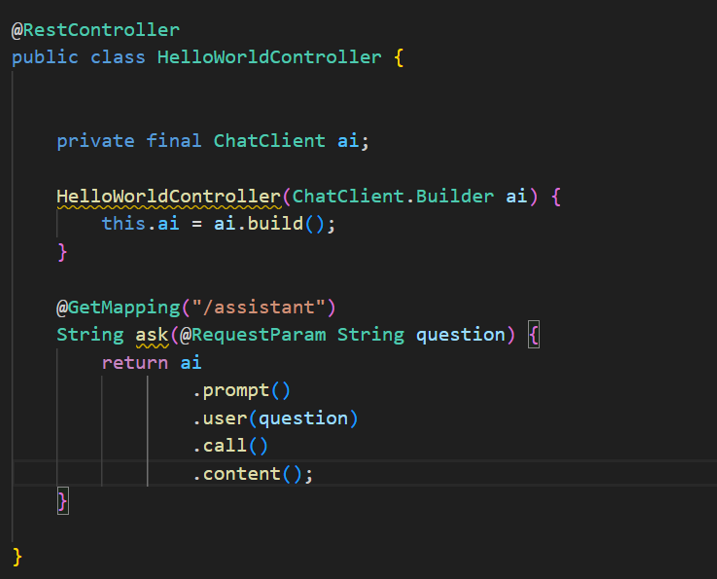
@RestController
@RequestMapping("/assistant")
public class HelloWorldController {

    private final ChatClient chatClient;

    public HelloWorldController(ChatClient chatClient) {
        this.chatClient = chatClient;
    }

    @GetMapping
    public String ask(@RequestParam String question) {
        return chatClient.call(question);
    }
}
Step 3:
Run the application and access:
`http://localhost:8080/assistant?question=Hello`
Done! That's your first interaction with your LLM via Spring AI!
This is just the beginning of what it can do. Can you imagine all the cool projects we could build with this tool?